Keyword Rank Checker
Powered by Semrush Position Tracking
Check your Google keyword ranking in any location worldwide. See the ranking page, its key metrics, and the current search results for that keyword.Need more than a single keyword check? Try Position Tracking.
How to Use the Keyword Ranking Checker
1
Enter a keyword and your website URL in the fields above2
Choose a target location and click "Check Keyword Ranking"3
Check your keyword ranking, ranking page, and top 10 results
What Is a Keyword Rank Checker?
A keyword rank checker is an SEO tool that shows exactly where a website ranks in Google search results for a specific keyword. Semrush’s rank checker also displays Google’s top 10 search results for the keyword, as well as the site’s top keywords and traffic-driving positions.
Keyword ranking checkers are useful because they provide instant, accurate, and location-specific results that manual searches can’t.
Google search rankings vary by location and personalization, which makes it hard to know your true position. A rank checker removes that uncertainty and shows exactly where your site ranks in your target location.
Baselining your actual position for high-value keywords helps you track progress, identify SEO opportunities, and compete in Google search more effectively.
This Keyword Rank Checker is powered by Semrush’s Position Tracking tool.

Why Check Your Website Keyword Ranking?
You should check your website’s keyword rankings because they show whether your pages appear for the searches you care about and help you decide what to do next. Website rankings show which pages need work, which keywords are close to page one, and which competitors are taking the positions above you.
From there, rankings become a simple prioritization tool. They help you identify quick wins (keywords that are already close to page one), problem pages (rankings that are slipping or stuck), and gaps where competitors consistently outrank you.
Keyword rankings are also how you measure the impact of changes. After you update a page, compare your position before and after to see what improved, what declined, and what to adjust next.
Regular rank checks help you catch drops early, protect the pages that already drive traffic, and stay on top of shifts caused by competitor updates or Google changes.
To understand what keyword ranking actually means for traffic, look at what SERP features appear on the results page for that keyword. AI Overviews, featured snippets, and People also ask can reduce clicks, and being included in them can matter as much as your rank.
Finally, tracking rankings over time helps you focus your effort where it pays off. It gives you a clear record of progress and a practical way to report results over weeks and months.
Need to improve your search visibility?
Get StartedStrengthen your positions across Google and AI search:
Track Website & Keyword Rankings Over Time
Track your rankings for target keywords and monitor changes over time.
Monitor AI Search Visibility for Your Brand
See when you are mentioned in AI answers and which competitors get cited instead.
Find Valuable Keyword & Prompt Opportunities
Discover the queries buyers use, then target them with pages you can improve.
What’s in Your Keyword Ranking Report?
Keyword ranking
Your website’s current position in Google’s organic search results for the entered keyword in the selected location.
Ranking page
Your website’s highest ranking URL for the keyword, and key metrics for the page, including backlinks and estimated traffic.
Keyword overview
Search volume, keyword difficulty, CPC, and an estimate of how much traffic you get with your current keyword ranking.
Google search results
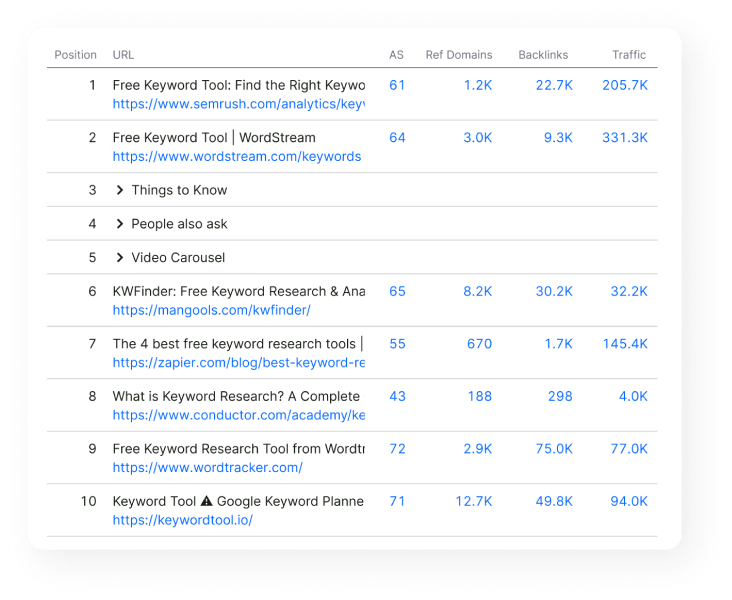
The top 10 ranking pages in Google search for the entered keyword, including your site (if it appears) and competing pages.
SERP features
Search results features that appear for the keyword, such as AI Overviews, Featured Snippets, and People Also Ask.
Page metrics
For each ranking page, see Authority Score, backlinks, estimated traffic, and the number of keywords the URL ranks for.
The report also shows the top keywords driving traffic to the entered domain:
Top keywords: The keywords estimated to drive the most organic traffic to the domain.
Positions: Your site’s current ranking for each keyword.
Search volume: The estimated search demand for each keyword.
Traffic share: The estimated percentage of your website’s traffic driven by each keyword.
How to Use the Website Ranking Data
Analyze your keyword performance
Benchmark your Google keyword ranking in your target location, then compare your ranking page to the top 10 results to see how competitive the SERP is.Estimate organic traffic potential
Use search volume, keyword difficulty, and your estimated traffic from the keyword to assess the traffic opportunity of improving your ranking.Evaluate keyword value and intent
Use CPC as a quick signal of commercial intent, then confirm intent by reviewing the pages that rank in the top results.Identify keyword opportunities
Look for keywords where your site ranks on page 2 and page 3, then prioritize the best targets based on search volume, difficulty, and traffic potential.Plan your next SEO actions
Review SERP features (including AI Overviews), competitors, and backlink metrics to decide whether you need better on-page SEO, stronger content, or more links to rank higher.Track ranking changes over time
Re-check the same keyword after updates and compare your keyword position and estimated traffic to measure the impact.
Keyword positions falling short of your goals?
Try Semrush OneGet the insights you need to improve your search performance:
Track Rankings for Your Target Keywords
Monitor SEO performance for all your most important keywords.
Monitor AI Search Visibility
See where your brand appears in AI Overviews and AI answers, and track changes over time.
Analyze Technical Website Health
Crawl your site for SEO issues and get a prioritized fix list to improve performance.
Optimize On-Page Content
Find on-page SEO gaps and get clear recommendations to improve relevance and rankings.

Real Use Cases of the Rank Checker
Here are practical use cases of this Google rank checker:
- You want to choose a target keyword: Check volume, keyword difficulty, and CPC, then pick the keyword with the best mix of demand, difficulty, and value.
- You need a forecast for a ranking improvement: Note your current position and estimated traffic, then prioritize keywords where moving up a few spots is likely to result in more organic traffic.
- You’re stuck on page 2: Filter for page 2 and page 3 rankings, then focus on the terms with high volume and manageable difficulty for faster wins.
- You need to know why competitors outrank you: Compare your ranking page to the top 10 results, then decide whether you need to match intent, improve content depth, or close a backlink gap.
- Your rankings changed and you need to find out why: Re-run the keyword, confirm the ranking URL, then check what changed in the top 10 results and SERP features.
- You’re seeing AI Overviews appear for the keyword: Treat AI Overviews as part of the SERP, then adjust your page to better match intent and add clear, citable sections.
What to Do If Keyword Rankings Change
If one keyword dropped
- 1
Confirm the change
Use a reliable keyword rank tracker to verify whether the movement is real and consistent, and not just a temporary fluctuation.
- 2
Confirm the ranking page
Check whether Google is ranking a different URL than before and whether the new page matches search intent better.
- 3
Compare the SERP
Review the top 10 results and SERP features (including AI Overviews) to see what changed, including newer pages, different formats, or stronger pages.
- 4
Review your content
Ensure your page matches intent, covers the key subtopics, and is up to date.
- 5
Update and improve
Add missing sections, examples, and clearer answers where competitors are stronger.
If many keywords dropped
- 1
Confirm the change
Check a few important keywords and locations to verify the changes you’re seeing are consistent.
- 2
Check your site
Look for technical issues that affect many pages, like indexing problems, template changes, internal linking changes, broken pages, or slow load times.
- 3
Analyze competitors
Check whether competitors made broad improvements, like a sitewide redesign, content updates, or link growth.
- 4
Monitor over time
Keep tracking to confirm recovery after making the necessary fixes. If you need ongoing monitoring across many keywords, use a rank tracking tool.
If rankings vary by location
- 1
Confirm the change
Re-run the same keyword across locations to confirm the pattern.
- 2
Check intent by location
Review the top results in each location. The “best” pages, formats, and competitors can change by region.
- 3
Adjust your approach
Consider localized pages, local SEO signals, or region-specific content where needed.
Let Semrush Track Your Keyword Rankings
Try Position TrackingTrack your target keywords across locations and devices, and get alerts when rankings change.
Daily Keyword Tracking
Monitor rankings over time so you can spot gains and drops without manual checks.
Accurate Location and Device Data
See how you rank in specific cities and countries on desktop and mobile.
Competitor Comparisons & Insights
Track your search visibility next to competing sites for the same keywords.
SERP Features and AI Visibility
See when features like AI Overviews appear and track whether you show up in them.

Combine Keyword Rank Tracking and SERP Analysis
Your keyword rank shows where you appear in Google for a keyword in a specific location. The top 10 search results show what you’re competing against.
Use the Google search results to check if you’re targeting the right type of page. If most results are tools, lists, guides, product pages, or local pages, that’s the format Google has determined meets the intent for that search.
Look at the page titles in the top 10 results and note what they have in common. Common patterns include “free”, “tool”, “checker”, “best”, numbers, or the current year. Use those patterns to improve your page title so it matches what searchers expect.
Compare your ranking page to the top results using the page metrics in the report. If the top pages have much higher Authority Scores, more referring domains, or more backlinks, you may need stronger internal links and more backlinks to compete.
Check which SERP features appear for the keyword, including AI Overviews. If features take up space above the results, you may get fewer clicks even if you rank well. In that case, add a short, direct answer on your page and use clear headings so your content is easier to surface and quote.
Who Will Benefit from the Rank Checker?
SEO Professionals
SEO professionals need to monitor ranking changes and spot competitor moves to adjust their strategies. A keyword rank check helps them confirm where gains or losses are happening and guides next steps for content, links, or technical fixes.Digital Marketers
Digital marketers need to tie SEO performance to traffic and conversions. Checking keyword rankings helps them see which terms are driving results, measure campaign impact, and show stakeholders how visibility connects to growth.Small Business Owners
Small business owners need a simple way to understand how customers find them online. A keyword check shows whether their products or services appear in search, highlights easy wins, and points to where basic updates can bring more visibility.Startups
Startups need to track early traction and prove growth to investors or stakeholders. Keyword checks help them see if their content is gaining visibility, compare against competitors, and focus scarce resources on the highest-potential opportunities.
Frequently Asked Questions
What Is a Keyword Ranking?
How Often Should I Check My Keyword Positions?
How Can I Check My Website Keyword Ranking on Google?
Is the Keyword Rank Checker Free?
How Does the Keyword Rank Checker Work?
What Can I Do If I’m Not Ranking Well for Keywords?
Why Do I See Different Rankings When I Search?
Are competitors outranking you on key terms?
Monitor keyword movements daily to understand where they’re winning and how to respond.
